Build Your Own Website with an AI Agent (No Code Experience Needed)
A step-by-step walkthrough of building a real website using an AI coding agent. No code experience required. I built two demo sites off a single prompt.
Based on everything we've talked about in previous posts, let's do a project from end to end: let's build your website. Even if you don't have any code development or cloud experience. This is a great practical project because everybody needs a website. If you're an employee, this can be your portfolio site, if you're trying to sell your art, your services, your products, you need a site to sell it or explain it from.
What You'll Need
- A paid AI subscription. I recommend the Claude Pro plan, but this will work just as well with ChatGPT Plus. I wouldn't recommend plans lower than this as you will hit your daily or 5-hr limit so quickly it'll be difficult to finish the project.
- Claude Code or ChatGPT Codex installed. We're going to download the Command Line Interface (CLI) program specifically.
- A web browser for viewing what the agent builds.
- An hour or two.
Getting Started
Now that you've got that installed, let's go over our project outline. We are going to build a website locally. We're going to create an editing interface so that we can visually edit the site. And then when we're happy with it, if you're willing to take the next step, this is sort of an advanced level, we're going to use the agent to sign up for a cloud program, Azure in our instance, and then we're going to have the agent deploy our website to the cloud. Of course, if you don't want to deploy it to the cloud yourself, now that you have the website code developed, that makes things much easier for you to get somebody else to host it for you. So even if you don't want to do that, you're still gonna be 90% of the way to getting your website fully deployed. And you can do this much cheaper than if you're gonna hire somebody else to do it, but this is also just a good exercise to get your feet wet. As you'll see, we're not gonna make any manual changes to the code. We're not even gonna look at the code. That's part of the magic of this, is that you don't have to know anything about it. You do have to have a systems centric mindset. And what I mean by that is we're not gonna worry what's going on under the hood, but we do need to have a basic understanding as to which application and service is connecting to the other, because we need to be able to direct our agent. Now the agent can even help you with this part, and that's really the key.
This is another example of AI being a force multiplier. You can use the AI agent to help you understand how to use the AI agent in a better way. More effectively. So if you want to understand the technology, this is a great way to do it. But also you'll learn as you get more and more experience when to let the agent make decisions and when to do it yourself. So you may have some requirements. Maybe you don't like the way the site looks, or it's not custom enough, or it's not pretty enough, whatever. You can learn, well, what framework could I use to make it look better, and you can ask the AI agent, why does the website look like this. Here's a link for a website that I like. Why does it look like this? And my website looks like this. And it will be able to break that down for you so well. AI is an incredible tutor. It doesn't get frustrated, it doesn't get bored, you can never ask a stupid question to an AI. It will answer anything you ask. So take advantage of that. You're saving so much time in the long run by using AI, it's worth it to slow down and have it explain concepts to you that you feel like you're missing or would be important to you moving forward for other projects. And if you've added some of these skills that I mentioned above, you can even have it break that down for you visually, which is a great learning aid.
Planning Your Site
Okay, now let's start thinking about what kind of website you want to have. Let's not try to do any shop or e-commerce just yet. That is a little bit beyond the scope, but you can absolutely use these skills that you've learned here to help you build your own e-commerce platform that you can plug other things in like Shopify or Shop.com. So is your website going to be a single page portfolio site? Is it going to be a blog site? Are you going to try and sell multiple products through this site and so you need lots of pages? Are you doing something creative? Are you sharing media like photos or videos? I want you to take a minute and write down what you want the site to do for you, and then when you're completely done with that, I want you to start thinking about what you want it to visually look like and actually Google some things. Go out and look at some live websites today. You can Google something like "website designs" or "top designed websites," something along those lines to give you a better idea. So go ahead and grab three or four links from different websites that you really like the visual design of.
Now that you've got those sites, Google a color picker and see which colors for the themes you'd like to use. And if you just Google "color picker," you'll see a little tool that Google has, and that will allow you to grab the RGB value or the hex code value. Now if this is too much for you, that's okay. You can skip this. If you ask your agent to help you pick out the colors and to use a color wheel so that it can grab the color values, it can build that for you as well. So take these links, take the color values that you have, and then the description that you wrote down, and put that into a prompt in the CLI for your agent.
Brainstorm Before You Build
Something to keep in mind is that agents are very eager to start building. The system prompt for Claude is different in the command line than it is in the web UI. So it's always in a hurry to build when it has been given tools in the CLI to build. So one thing I like to do before we actually send our prompt off is I like to brainstorm what we're doing and what the agent will use to accomplish it. I also like to start with a prototype first. So I would tell it something like "this is what I want to build," and give it all of the information that you just put together, and then say, "but for right now, let's just brainstorm and don't build anything. What would my stack be?" And it's gonna ask you questions like which framework should I use, do you want to do vanilla HTML and CSS, all that kind of stuff. You don't have to know everything about it. Just ask it what would be the simplest way for you to build this website. What would be the things that would be a hard stop? Like if you gave it some really nice flashy websites that you want to copy off of, you're probably going to have to use some kind of framework. And if you don't know what a framework is or why it's picking that one, simply have it walk you through. And you can definitely tell it, "I'm not a technical person, you're gonna have to explain it to me in general terms," and it will do so.
Your First Prompt
I recommend you start with "vanilla" HTML/CSS/JavaScript. So our first prompt would look something like this:
"I want you to build me a vanilla HTML CSS JS single page website based on these website links: nololabs.us, cloudboard.nololabs.us. And I want you to use these colors for the theme: #F54927, #4DF527, #E027F5. Before we deploy it or go any farther, can you show me three examples of how you might design this website so I can visualize it. This is going to be my personal landscaping company landing page. Just put version one, two, and three as an inline HTML file in this directory."
The agent may ask you some follow up questions, which you can answer, then check the websites it produces. If you're unsure of how to answer, spin up another session and tell that agent what's going on, and ask it to help explain whatever it is that you don't know. One key thing here, the agent will pull the code for the example websites, it won't actually see them visually. The only way it can do that is if you take a screenshot of the page and drop it into the working directory for the agent. That's not a bad idea either. You could also give the agent its own tool like Playwright. This will allow it to spin up its own browser and take screenshots within the browser. I recommend adding this tool when creating any websites that you actually want to deploy to the internet. So let's go ahead and talk about how to add that in now.
Adding Playwright (Browser Tool)
For Claude Code simply run the plugin command: /plugin and then search for "playwright" and it will be added to your agent, but you will need to restart the session for it to pick it up.
For ChatGPT Codex:
codex mcp add playwright -- npx @playwright/mcp@latest
codex mcp list   # confirm it registered
For any other coding agent you should be able to add the MCP for Playwright globally:
npm install -g @playwright/mcp
npx playwright install chromium
Then tell your agent what you did to install it and to connect the MCP for Playwright to itself.
Review and Iterate
Find the HTML files in the current directory that you ran your agent in and view them in your browser. Make some notes on what you like and don't like, what you want to change in the final design. These screenshots are the actual drafts of websites that my Claude Code instance built. I was actually very surprised at how polished these look and this was based off of the exact same single prompt that I gave above.
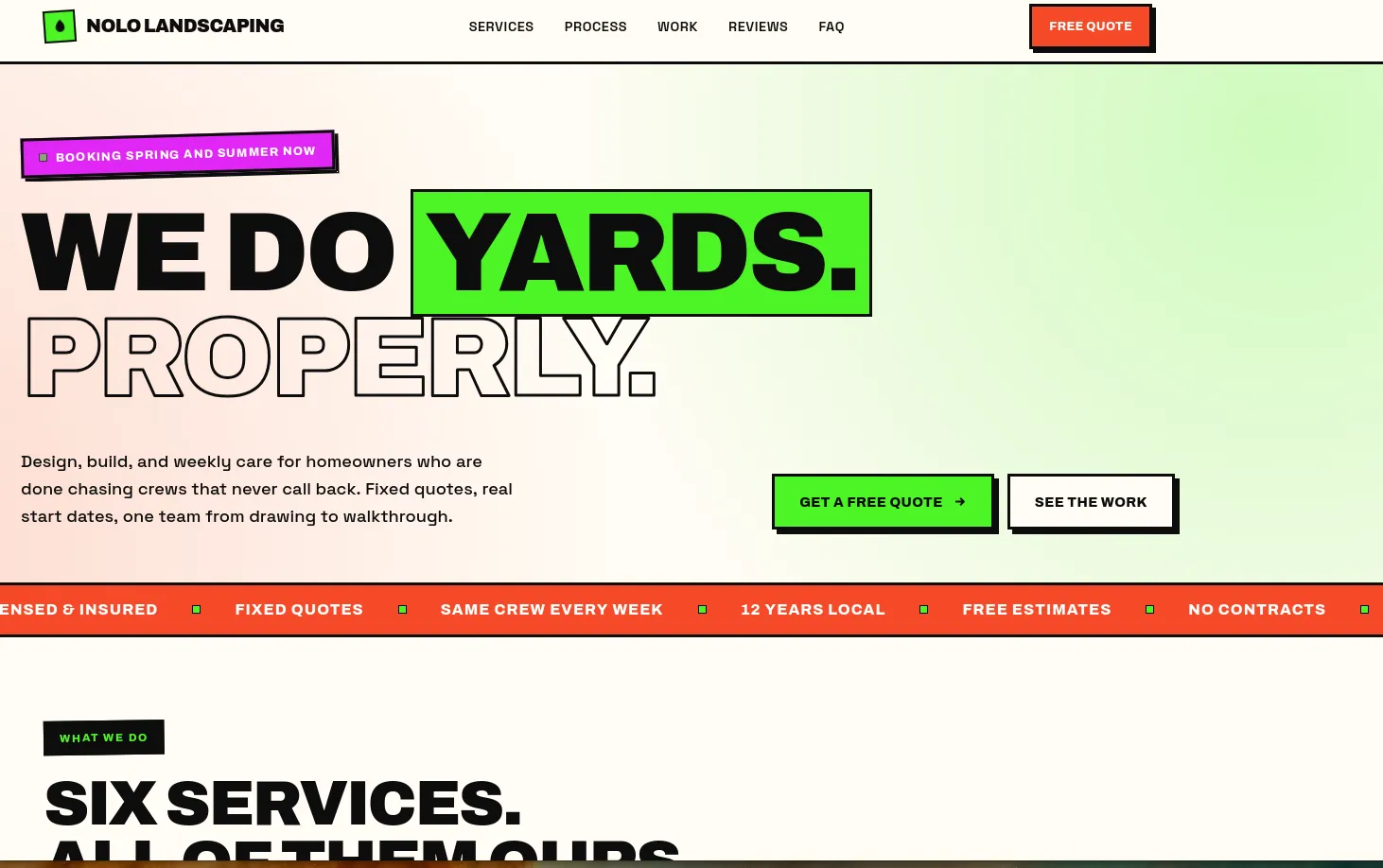
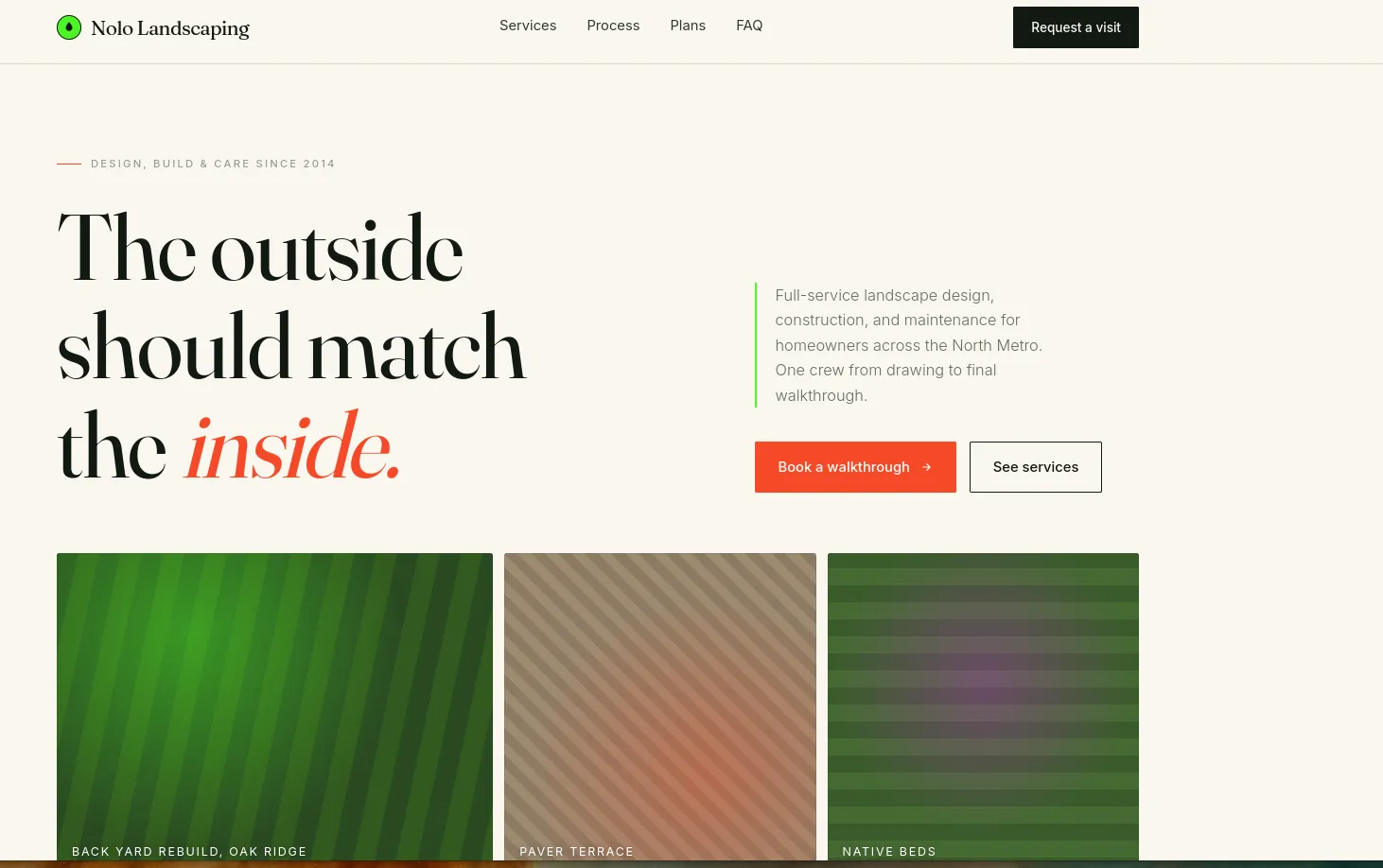
At this point you can give it some feedback on what you want to change, how you want to update the design or layout, or even if you want to add additional pages. I would go ahead and get this set up exactly as you want before you try to deploy to the internet. I would also hold off on doing anything like adding bookings or shopping, but you can always go back and add that in.
Hosting Your Site
Once you have the web page exactly as you want it, now you have to decide how you're going to host it. You can use a hosting service like Bluehost or Hostinger (I'm not affiliated with any of these providers) for around $5 or so a month. Or you can host it in Azure, Amazon Web Services, or Google Cloud Platform in a static storage bucket for a few pennies a month. Of course there is a higher barrier to deploying them yourself, but with an agent you can learn to do it as you go. Using the agent to walk you through signing up for a cloud service and then deploying it might take you an afternoon, but then you'll be finished. Either way, you now should have your website file that you can host wherever you want, and you can control that data instead of using a templating site like Squarespace or something like that. You have your own website and you can refine it and change it later as you desire.
And that's all there is to it. Now you can imagine how there is a limitless number of projects that you can do with an agent. Very similar to this. Another thing that I recommend is building an Electron or Tauri app which will work on Windows, MacOS, or Linux. So if there is a desktop application that you would like to have, some kind of app that has a functionality that doesn't exist or isn't quite the way you like it, Electron and Tauri are a very easy way to get an agent to build this application for you. And it's something that I do often.
Want to learn this live, with someone walking you through it? Book a training session.